Your payroll deposit allocation form, ready in minutes
For employees who want to divide their paycheck across two or more bank accounts. Fill out the form, watch the live preview, and download a print-ready PDF to hand to your employer or payroll department.
Preview locked
Complete payment to download
What to expect
While on the form
- What you fill here ends up on your document, no extra data requested
- Live preview updates as you go, inline hints flag accidental mistakes
- Add or remove account rows to match your deposit needs
At checkout
- A flat $9 transaction. No extra fees, no surprise charges
- Stripe handles your payment data, we never see it
- Processing fees come out of our end, not added to your total
After payment
- Print-ready PDF and JPG, emailed and downloadable instantly
- Your inputs are wiped after delivery, only your email and order details kept for billing
- Hassle-free refund policy (see below)
See a sample
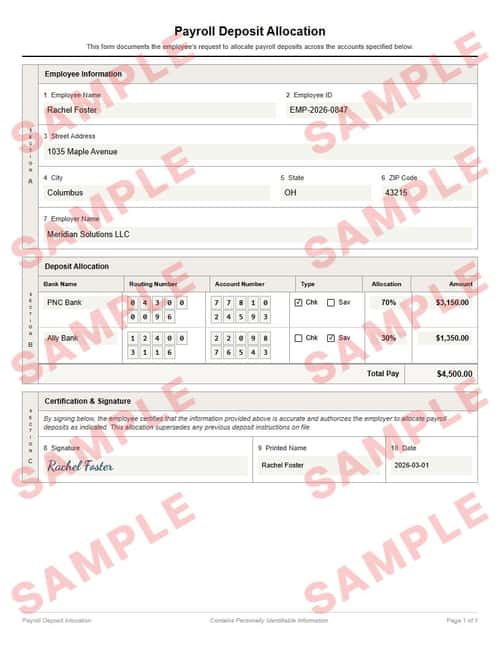
Everything you see here — the formatting, the text, the layout — is exactly what your final document will look like. Only the inputted fields will be replaced with your details.
You can download a sample JPG to keep; the download is intentionally watermarked and slightly pixelated, but both your final PDF and JPG will be crisp and clean.
Refund policy
You’re covered if your delivered document doesn’t match the watermarked sample’s layout or formatting. Email [email protected] with the document attached, and we’ll get back within 2 business days with either a refund or an updated document — whichever you prefer.
We don’t typically cover typos or input mistakes — unless you catch us in a good mood.
What is a payroll deposit allocation form?
A payroll deposit allocation form is a written instruction to your employer directing them to split your net pay across multiple bank accounts. Instead of receiving your entire paycheck in one account, you can route fixed amounts or percentages to separate checking and savings accounts automatically every pay period.
Most employers require a signed form on file before they will change your deposit setup. This document gives payroll the routing numbers, account numbers, account types, and split instructions they need — all on a single page with your signature authorizing the change.
Some organizations also request a voided check alongside this document. Generate a voided check →
Want the background first? Learn more about payroll & direct deposit →
Step-by-step guide: Direct deposit allocation explained →
Loved by our customers
Over 1.2 million documents generated for more than 8,000 happy customers
Set It and Forget It
I wanted 30% of every paycheck going straight to savings without having to transfer it manually. Filled out the form, handed it to HR, and it was active by the next pay cycle. Easiest financial habit I’ve ever built.
Kevin M.
Exactly What Payroll Needed
My company’s payroll portal didn’t have an option to split deposits, so they asked for a signed form. This gave me a clean, professional document in about three minutes. No back and forth with HR.
Stephanie R.
Saved Me from Myself
I kept telling myself I’d transfer money to savings after each paycheck, and I never did. Now $500 goes to savings automatically before I even see it. The form made the setup painless.
David L.
Frequently asked questions
What are the common mistakes to avoid when filling out this form?▼
- Not designating one account as the remainderIf you assign fixed dollar amounts or percentages to every account, rounding or net pay fluctuations can leave pennies unallocated — or overdraw an allocation. Set one account to “Remainder” so it catches whatever is left.
- Using the wrong routing numberYour routing number is the 9-digit code at the bottom left of a check or on your bank’s website. Do not confuse it with your account number or your bank’s wire transfer routing number, which is often different.
- Forgetting to sign the formPayroll departments will reject an unsigned allocation form. If you leave the signature blank to sign by hand later, make sure you actually sign it before submitting. An unsigned form means no change to your deposits.
- Allocating more than 100% of net payIf your percentages or fixed amounts add up to more than your net pay, payroll cannot process the form. Double-check your math before submitting — the total of all allocations should equal exactly 100% or your full net pay amount.
What is a payroll deposit allocation form?▼
A payroll deposit allocation form is a signed document that tells your employer how to divide your net pay across multiple bank accounts. You specify each account’s routing number, account number, account type (checking or savings), and the portion of your pay to send there — either a flat dollar amount, a percentage, or the remainder.
How many accounts can I split my paycheck into?▼
Most employers allow two to five accounts. The form supports as many rows as you need. Check with your payroll department if there is a limit — some payroll systems cap the number of splits.
What is the difference between flat amount, percentage, and remainder?▼
Flat amount sends a fixed dollar amount to that account every pay period. Percentage sends a set percentage of your net pay. Remainder sends whatever is left after all other allocations are fulfilled — exactly one account should be set to remainder so every dollar is accounted for.
When does the new allocation take effect?▼
It depends on your employer’s payroll schedule. Most changes take effect within one to two pay cycles after your payroll department processes the form. Submit it well before the next pay date to avoid delays.
Does this replace my existing direct deposit setup?▼
Yes. The form states that the new allocation supersedes any previous deposit instructions on file. Once processed, your employer will follow the updated split for all future pay periods until you submit another change.
What if I only have one bank account?▼
You can still use the form with a single account row and allocate 100% or the full remainder to that account. However, most people use this form specifically because they want to split across two or more accounts.
Key terms
- Payroll deposit allocation
- A formal instruction to an employer specifying how to divide an employee’s net pay across two or more bank accounts each pay period.
- Routing number
- A 9-digit code that identifies your bank. It appears at the bottom left of a check and is used by payroll systems to direct deposits to the correct financial institution.
- Remainder allocation
- A deposit instruction that sends whatever is left of your net pay after all fixed-amount and percentage allocations have been fulfilled. Exactly one account should use this type.
- Net pay
- Your take-home pay after all deductions — taxes, insurance, retirement contributions, and other withholdings. Deposit allocations apply to net pay, not gross pay.
- Direct deposit
- An electronic transfer of funds from an employer’s bank account directly into an employee’s bank account on payday, replacing paper checks.
Google Policies
My Check Pros is a document generation tool and is not affiliated with, endorsed by, or in any way officially connected with any financial institutions mentioned. Read our disclaimer.
My Check Pros is owned and operated by Miruvor, an independent studio based in Washington, D.C., focused on researching and building in the payments, fintech and agentic AI space.