Your W-9 form, ready in minutes
For contractors, freelancers, and vendors who need to provide their TIN to a payer. Fill out the form, watch the live preview, and download a print-ready W-9 PDF.
Preview locked
Complete payment to download
What to expect
While on the form
- What you fill here ends up on your document, no extra data requested
- Live preview updates as you go, inline hints flag accidental mistakes
- Chatbot responses on this page, typically within 24 business hours
At checkout
- A flat $9 transaction. No extra fees, no surprise charges
- Stripe handles your payment data, we never see it
- Processing fees come out of our end, not added to your total
After payment
- Print-ready PDF and JPG, emailed and downloadable instantly
- Your inputs are wiped after delivery, only your email and order details kept for billing
- Hassle-free refund policy (see below)
See a sample
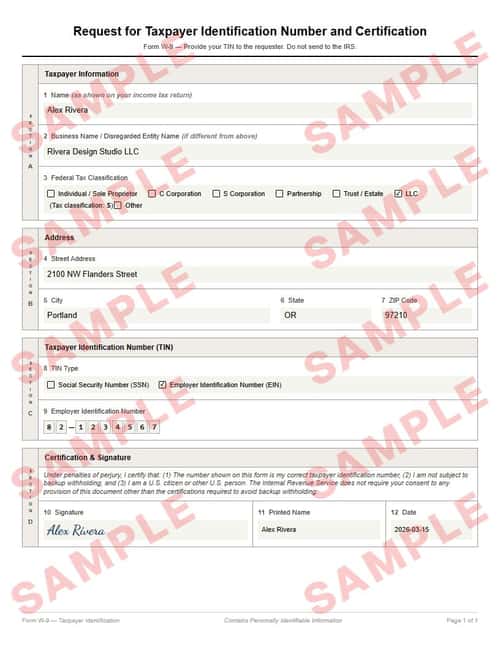
Everything you see here — the formatting, the text, the layout — is exactly what your final document will look like. Only the inputted fields will be replaced with your details.
You can download a sample JPG to keep; the download is intentionally watermarked and slightly pixelated, but both your final PDF and JPG will be crisp and clean.
Refund policy
You’re covered if your delivered document doesn’t match the watermarked sample’s layout or formatting. Email [email protected] with the document attached, and we’ll get back within 2 business days with either a refund or an updated document — whichever you prefer.
We don’t typically cover typos or input mistakes — unless you catch us in a good mood.
What is a W-9 form?
A W-9 form is the IRS’s Request for Taxpayer Identification Number and Certification. When a business pays you $600 or more in a calendar year, they’re required to report that income to the IRS on a 1099 — and they need your TIN to do it. The W-9 is how you provide that number.
You don’t send the W-9 to the IRS yourself — you give it to the payer (your client, employer, or financial institution). They use it to file accurate information returns. Providing a correct, signed W-9 up front avoids backup withholding, payment delays, and year-end scrambles.
Some organizations also request a voided check alongside this document. Generate a voided check →
Want the background first? Learn more about tax forms →
Step-by-step guide: W-9 vs. W-4 vs. 1099 explained →
Loved by our customers
Over 1.2 million documents generated for more than 8,000 happy customers
Needed It Yesterday
Started a new contract gig and the client wouldn’t release payment until they had a W-9 on file. Had the form filled out and sent over in under five minutes. Payment cleared two days later.
Marco D.
Clean and Professional
I’ve been hand-filling W-9s for years and they always looked sloppy. This came out clean, formatted correctly, and the live preview let me catch a typo before paying. Worth the nine dollars.
Keisha R.
No Guesswork
I wasn’t sure whether to use my SSN or EIN, and the form guided me through it. The entity type checkboxes and LLC classification matched exactly what my accountant told me to select. Sent it off and the client accepted it same day.
Tom H.
Frequently asked questions
What are the common mistakes to avoid when filling out this form?▼
- Using the wrong TIN typeSole proprietors often use their SSN, but if you have an EIN for your business, use that instead. Mismatching the TIN type and number triggers IRS notices and can lead to backup withholding on future payments.
- Forgetting to sign the formThe W-9 requires a signature — it’s a certification under penalties of perjury. An unsigned form is incomplete, and the payer may withhold 24% of your payments until they receive a signed copy.
- Submitting outdated informationIf your name, address, TIN, or entity type has changed since your last W-9, submit a new one. Payers rely on the most recent form for 1099 reporting — outdated info causes mismatches that trigger IRS correction notices.
- Sending the W-9 to the IRSThe W-9 goes to the payer (your client or financial institution), not to the IRS. The payer uses it to file information returns. Sending it to the IRS directly serves no purpose and may cause confusion.
What is a W-9 form used for?▼
A W-9 is how you give your taxpayer identification number (SSN or EIN) to a payer — typically a business that will pay you and needs to report that income to the IRS. The payer keeps the W-9 on file; you do not send it to the IRS yourself.
Who needs to fill out a W-9?▼
Anyone who receives payments that may be reported on a 1099. That includes freelancers, independent contractors, sole proprietors, LLCs, partnerships, and vendors. If a client or payer asks you to complete one, it’s because they’re required to report your income.
What happens if I don’t provide a W-9?▼
The payer may be required to withhold 24% of your payments as backup withholding and send it to the IRS on your behalf. You’d then need to claim the withheld amount when filing your tax return. Providing a correct W-9 up front avoids this.
Should I use my SSN or EIN on the W-9?▼
Sole proprietors and individuals typically use their Social Security Number. If you have an EIN for your business (LLC, corporation, partnership), use that instead. Using an EIN can help keep your SSN off documents that circulate between businesses.
Is the signature on the W-9 required?▼
Yes. By signing, you certify that the TIN you provided is correct, that you’re not subject to backup withholding (unless you are), and that you’re a U.S. person. Without the signature, the W-9 is incomplete and the payer may not accept it.
Does a W-9 expire?▼
The IRS doesn’t set a formal expiration, but most payers request a new W-9 every three years or whenever your information changes (name, address, TIN, or entity type). If in doubt, ask the payer whether they need an updated form.
Key terms
- Taxpayer Identification Number (TIN)
- A number used by the IRS to identify taxpayers. For individuals, this is typically a Social Security Number (SSN). For businesses, it’s an Employer Identification Number (EIN).
- Backup withholding
- A 24% withholding the payer must apply to your payments if you fail to provide a correct TIN or if the IRS notifies the payer that you underreported income. Providing a valid, signed W-9 exempts you.
- 1099 form
- An IRS information return that payers file to report income they paid to non-employees. The payer uses the TIN from your W-9 to prepare the 1099. Common variants include 1099-NEC (nonemployee compensation) and 1099-MISC.
- Employer Identification Number (EIN)
- A nine-digit number (XX-XXXXXXX) assigned by the IRS to businesses for tax reporting purposes. LLCs, corporations, and partnerships use an EIN instead of a personal SSN on their W-9.
- Certification
- The signature section of the W-9 where you certify, under penalties of perjury, that your TIN is correct, you are not subject to backup withholding, and you are a U.S. person.
Google Policies
My Check Pros is a document generation tool and is not affiliated with, endorsed by, or in any way officially connected with any financial institutions mentioned. Read our disclaimer.
My Check Pros is owned and operated by Miruvor, an independent studio based in Washington, D.C., focused on researching and building in the payments, fintech and agentic AI space.