Save automatically every payday, no willpower required.
Fill the form to get a paycheck split authorization, with a voided check attached for every account. Hand it to your employer's payroll department — they'll route each paycheck across your accounts for savings, bills, the kids, cleaner cash flow, whatever you need. We never store your bank details.
Check with your employer first that they support “Split Direct Deposit.”
Preview locked
Complete payment to download
What to expect
Fill in your accounts
- Add up to 4 destination accounts — checking, savings, or money market.
- Enter the routing and account number for each.
- Choose how each account is funded: percentage, dollar amount, or Remainder.
Watch the live preview
- The PDF preview updates as you type — no surprises at checkout.
- Each account's allocation appears in the authorization table.
- A separate voided check page is attached for every account.
Sign, pay, and download
- Type your signature or leave it blank to sign by hand later.
- Pay $22 once — no subscription, no mailing list, no stored banking data.
- Download the PDF immediately; we email it too if you provide an address.
See a sample
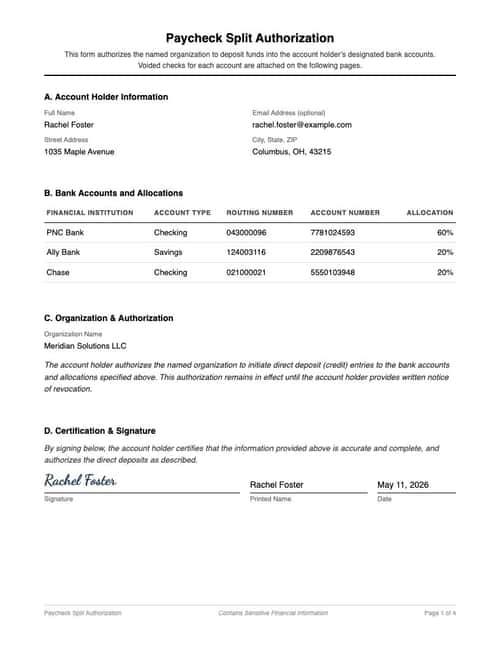
Everything you see here — the formatting, the text, the layout — is exactly what your final document will look like. Only the inputted fields will be replaced with your details.
You can download a sample PDF to keep; the download is intentionally watermarked and slightly pixelated, but both your final PDF and JPG will be crisp and clean.
Refund policy
You’re covered if your delivered document doesn’t match the watermarked sample’s layout or formatting. Email [email protected] with the document attached, and we’ll get back within 2 business days with either a refund or an updated document — whichever you prefer.
We don’t typically cover typos or input mistakes — unless you catch us in a good mood.
What is a paycheck split authorization form?
A paycheck split authorization form is a signed document that instructs your employer to divide each paycheck electronically across multiple bank accounts according to the allocations you specify. You can split by percentage, fixed dollar amount, or designate one account as the remainder recipient.
Most payroll departments accept this form to set up or change split direct deposit. The form includes your personal information, the routing and account numbers for each destination account, and your signed authorization.
If you only need a single voided check with no authorization form, Generate a voided check →
Want the background first? Learn more about payroll & direct deposit →
Step-by-step guide: How to split your paycheck across accounts →
When do you need this?
Automatic savings every payday
Route a fixed dollar amount to a savings or investment account so the money is gone before you can spend it. The rest goes to checking automatically.
Splitting between joint and personal accounts
Couples or roommates use this to send part of each paycheck to a shared account for bills and the rest to a personal account, all in one signed authorization.
Funding multiple goals at once
Direct percentages to an emergency fund, a vacation fund, and a brokerage account — every paycheck, automatically, without manual transfers.
Updating an existing split
If your payroll department already runs split deposit but the allocations are out of date, this form replaces the previous instructions.
Loved by our customers
Over 1.2 million documents generated for more than 8,000 happy customers
Quick Direct Deposit Setup
As someone who banks entirely online, getting a voided check was always a hassle. This tool made it super easy and the check was accepted right away for my direct deposit.
Patricia M.
Reliable for Personal Banking
Needed a voided check for automatic bill payments but was out of checks. This service was exactly what I needed — fast, accurate, and accepted by my service provider without any issues.
Sarah T.
Perfect for Freelancers
As a freelancer with multiple clients, I frequently need voided checks for payment setup. This service has become an essential part of my business toolkit. Simple and professional!
Emily C.
Perfect for Payroll Setup
As a small business owner, setting up direct deposit for 20+ employees was daunting. This service made it incredibly simple — generated all the voided checks in minutes. Saved hours of bank visits!
Michael R.
Essential Business Tool
Our accounting department uses this regularly for setting up vendor payments. The professional quality and security features give us confidence. Highly recommend for business use.
James L.
Great for Property Management
Managing multiple rental properties, I needed voided checks for various payment setups. This service streamlined our entire process. Now we can set up new payment systems in minutes.
Robert K.
Frequently asked questions
What are the common mistakes to avoid when filling out this form?▼
- Percentages don't total 100%Unless one account is marked as Remainder, the percentages across all accounts must add up to exactly 100%. The form's running total shows where you are in real time.
- Using dollar amounts without a Remainder accountFixed dollar amounts can't cover the whole paycheck on their own — you don't know the gross yet. Pair them with one Remainder account, or switch entirely to percentages.
- Marking more than one account as RemainderOnly one account can absorb whatever is left after the others. Pick the account you'd prefer to be variable from pay period to pay period.
- Account number off by one digitAccount numbers are typically 4 to 17 digits — different banks use different lengths. Verify yours against an existing check or your bank's online portal before submitting.
- Wrong routing number for international wiresThe 9-digit ACH routing number on the bottom-left of your check is what payroll needs. The wire routing or SWIFT code is different — don't confuse them.
What is a paycheck split authorization form?▼
A paycheck split authorization form is a document you give your employer that instructs payroll to divide each paycheck across up to four bank accounts. You specify the routing number and account number for each account, along with how much (by percent, dollar amount, or remainder) should go to each one.
How many accounts can I split my paycheck into?▼
This form supports one to four destination accounts. You can mix allocation types — for example, send $500 to savings, 10% to an investment account, and the remainder to your primary checking account.
Is my banking information stored after I create the form?▼
No. Your bank account numbers, routing numbers, and other sensitive details are used only to generate and deliver your document. They are not stored permanently on our servers.
How is this different from a regular direct deposit authorization?▼
A standard direct deposit authorization sends 100% of your paycheck to a single account. A paycheck split authorization divides each paycheck across up to four accounts according to allocations you choose. If your employer only needs single-account direct deposit, use our direct deposit authorization form instead.
Does my employer have to accept this form?▼
Most US payroll systems support split direct deposit. Some employers require you to use their own form instead of an external one — if so, you can copy the allocations and bank details from your generated PDF into their internal form.
Can I change my split allocations later?▼
Yes. Fill out a new paycheck split authorization with the updated allocations and submit it to your payroll department. The new form replaces the previous instructions.
What if one of the accounts is closed when the paycheck arrives?▼
Payroll will typically reject the deposit for that account and return it to the employer, who will then issue you a paper check or hold the funds until you update your allocations. Contact your payroll department immediately if an account closes.
Do I need to sign the form digitally, or can I sign by hand?▼
Either works. The form has an optional digital signature field — type your name to render a signed PDF. If you leave it blank, the PDF prints with a signature line you can sign by hand before submitting.
Key terms
- Remainder account
- The single account that receives whatever is left of each paycheck after all other allocations are paid out. Useful when you want fixed amounts going to savings/investments and the rest landing in checking.
- ACH routing number
- The 9-digit number on the bottom-left of a paper check that identifies your bank for electronic payments. Different from a wire routing number or SWIFT code.
- Split direct deposit
- A payroll feature that divides each paycheck across multiple accounts in one transaction, rather than depositing to one account and requiring you to manually transfer to others.
- Allocation
- The rule for how each destination account gets its share — by percentage, fixed dollar amount, or as the Remainder.
Google Policies
My Check Pros is a document generation tool and is not affiliated with, endorsed by, or in any way officially connected with any financial institutions mentioned. Read our disclaimer.
My Check Pros is owned and operated by Miruvor, an independent studio based in Washington, D.C., focused on researching and building in the payments, fintech and agentic AI space.